Enable Ubuntu SSH Banner
Tech Tips - By Vincent Chan - 27 Dec 2024 (Fri)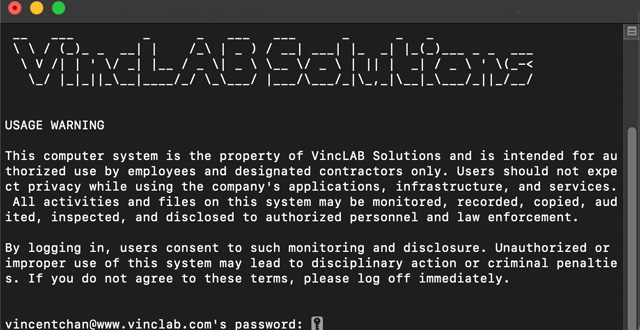
In order to address user inquiries regarding security and governance, it is required that all access to servers via SSH include usage warnings and system usage policy notices. This requirement can be implemented through a straightforward configuration.
Create a banner file. Where will name it as vinclab.banner
Sudo nano /etc/vinclab.banner
Than write your Usage Warning and System Usage Policy into it. If you have difficulties to have it below is the sample
"USAGE WARNING\n\nThis computer system is the property of Your Company Register Name and is intended for authorized use by employees and designated contractors only. Users should not expect privacy while using the company's applications, infrastructure, and services. All activities and files on this system may be monitored, recorded, copied, audited, inspected, and disclosed to authorized personnel and law enforcement. \n\nBy logging in, users consent to such monitoring and disclosure. Unauthorized or improper use of this system may lead to disciplinary action or criminal penalties. If you do not agree to these terms, please log off immediately. "
Open the sshd_config in the text editor (nano) to enable the banner configuration
sudo nano /etc/ssh/sshd_config
search for…
# Banner none
Than change it to…
Banner /etc/vinclab.banner
Save this sshd_config file and do the ssh service restart
Sudo systemctl restart ssh
You have completed to make your SSH with a Usage Warnings and System Usage Policy Notices Banner.
Meet the Author

Vincent Chan has 23 years of experience in IT Architech, Operations, Consulting, Infrastructure Products Principle, and System Integration Solutions. He is passionate about solving challenges and constantly seeks to learn new technologies. His hobbies include photography. You can connect with him at vinc.chanmc@yahoo.com.

Galloping into Prosperity Year
Tech Lifestyles - By Vincent Chan
08 Mar 2026 (Sun)

Start With Prosperity and Productivity
Tech Lifestyles - By Vincent Chan
25 Feb 2026 (Wed)

Crossing the Threshold to 2026
Tech Lifestyles - By Vincent Chan
28 Dec 2025 (Sun)

Patches Deferred Due to Phasing (Ubuntu)
Tech Tips - By Vincent Chan
17 Dec 2025 (Wed)

Chasing Cherry Blossoms Dream
Tech Lifestyles - By Vincent Chan
07 Nov 2025 (Fri)

Losing Our Humanity via Digital World
Tech Lifestyles - By Vincent Chan
21 Oct 2025 (Tue)

As a Ferrari Fan at Zandvoort
Tech Lifestyles - By Vincent Chan
01 Sep 2025 (Mon)

Network Storage Connection with iSCSI
Tech Tips - By Vincent Chan
13 Jun 2025 (Fri)

The Evolution of Battery Technology
Tech Tips - By Vincent Chan
10 Jun 2025 (Tue)

The Reality of IT Lifestyle
Tech Lifestyles - By Vincent Chan
03 Jun 2025 (Tue)