Enable Ubuntu Login Notification
Tech Tips - By Vincent Chan - 26 Dec 2024 (Thu)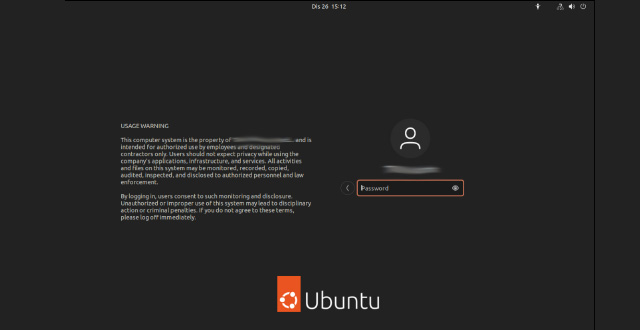
Many users have asked if there's a way to display a notification message on the login page to indicate company policies like Usage Warnings and System Usage Policy Notices. Yes, it is possible by following the steps provided.
Ubuntu 24.04 LTS uses the GNOME Desktop Manager Version 3 (gdm3), which allows you to add a Usage Warning or System Usage Policy Notice message. This helps meet the majority of company audit and compliance requirements.
Open the greeter.dconf-default in the text editor (nano)
sudo nano /etc/gdm3/greeter.dconf-defaults
Search and change the # banner-message-enable=true to banner-message-enable=true and # banner-message-text='Welcome' to banner-message-text='Welcome'
At the banner-message-text='Welcome' you can put your Usage Warning or System Usage Policy Notice message. If you don’t have one and don’t know how to draft it, here is a sample text :-
USAGE WARNING
This computer system is the property of Your Company Register Name and is intended for authorized use by employees and designated contractors only. Users should not expect privacy while using the company's applications, infrastructure, and services. All activities and files on this system may be monitored, recorded, copied, audited, inspected, and disclosed to authorized personnel and law enforcement.
By logging in, users consent to such monitoring and disclosure. Unauthorized or improper use of this system may lead to disciplinary action or criminal penalties. If you do not agree to these terms, please log off immediately.
Some users may not have the backend IT knowledge to perform such settings. You can simply use the provided code to replace it:
Search for…
# banner-message-enable=true

# banner-message-text='Welcome'
and replace it with…
banner-message-enable=true

banner-message-text="USAGE WARNING\n\nThis computer system is the property of Your Company Register Name and is intended for authorized use by employees and designated contractors only. Users should not expect privacy while using the company's applications, infrastructure, and services. All activities and files on this system may be monitored, recorded, copied, audited, inspected, and disclosed to authorized personnel and law enforcement. \n\nBy logging in, users consent to such monitoring and disclosure. Unauthorized or improper use of this system may lead to disciplinary action or criminal penalties. If you do not agree to these terms, please log off immediately. "
After the settings have been set, run dconf update. When entering message that spans several lines, remember to begin and end the string with =" if your message have ' and use \n for new lines.
Meet the Author

Vincent Chan has 23 years of experience in IT Architech, Operations, Consulting, Infrastructure Products Principle, and System Integration Solutions. He is passionate about solving challenges and constantly seeks to learn new technologies. His hobbies include photography. You can connect with him at vinc.chanmc@yahoo.com.

Galloping into Prosperity Year
Tech Lifestyles - By Vincent Chan
08 Mar 2026 (Sun)

Start With Prosperity and Productivity
Tech Lifestyles - By Vincent Chan
25 Feb 2026 (Wed)

Crossing the Threshold to 2026
Tech Lifestyles - By Vincent Chan
28 Dec 2025 (Sun)

Patches Deferred Due to Phasing (Ubuntu)
Tech Tips - By Vincent Chan
17 Dec 2025 (Wed)

Chasing Cherry Blossoms Dream
Tech Lifestyles - By Vincent Chan
07 Nov 2025 (Fri)

Losing Our Humanity via Digital World
Tech Lifestyles - By Vincent Chan
21 Oct 2025 (Tue)

As a Ferrari Fan at Zandvoort
Tech Lifestyles - By Vincent Chan
01 Sep 2025 (Mon)

Network Storage Connection with iSCSI
Tech Tips - By Vincent Chan
13 Jun 2025 (Fri)

The Evolution of Battery Technology
Tech Tips - By Vincent Chan
10 Jun 2025 (Tue)

The Reality of IT Lifestyle
Tech Lifestyles - By Vincent Chan
03 Jun 2025 (Tue)